
Rec The Bad Times trend, starring you
Angry Dance Filter AI
One photo in, a 15-second angry dance video out, starring you.
 The one photo
it was made fromAI-generated
Unedited 15-second samples, each made from the one photo in its corner. Yours follows your photo.

✓ One adult, face clearly visible✗ Sunglasses, tiny faces, kids, pets
Our own AI remake of the kitchen routine with you in it: no frame of any original clip is used. One adult per video.
Silent on purpose: add “Bad Times” by Imael Angel in TikTok or Reels when you post, so your video joins the trend. How
By tapping “Make my video”, you confirm that the person in your photo is 18 or older and is you or someone who agreed to be in it, that they are not a public figure, and you accept our Terms and Use Policy.
Examples
Angry Dance Filter AI video examples
Unedited HD results, each made from the single photo in its corner. They play silent, like your download.
The people in these examples were made with AI. See every example with its photo
At a glance
Angry Dance Filter AI at a glance
| Input | One photo of one adult (JPG, PNG or WebP, up to 10 MB) |
|---|---|
| Output | 15-second 9:16 MP4 at 720p, no watermark, for TikTok, Reels and Shorts |
| The scene | A bright white kitchen; the moves, the camera and the timing are the same in every video. Your video is our own remake of the angry dance, made once with AI-made performers in a white kitchen: your photo takes the performer’s place in every shot, and no frame of any original clip is used. |
| Audio | Silent on purpose: add “Bad Times” by Imael Angel in TikTok or Reels when you post |
| Price | $9.99 per HD video, or $7.00 each in the 10-video pack |
| Time | usually about 5 minutes; the finished video waits in My videos |
| Model | The template was made once with Seedance 2.0 and AI-made performers; your video is a Kling 4.0 edit of it |
| Privacy | Photos deleted after 2 days, videos after 14 days, nothing published |
| Safety | Photos and finished videos are checked automatically |
| Affiliation | Independent fan tool; not affiliated with TikTok, CapCut, ByteDance or Imael Angel |
| Updated | 2026-11-01: first version |
What is the Angry Dance Filter AI trend?
It started in 2026 as a TikTok lip-sync: people mouthed Imael Angel’s deep-house song “Bad Times” while arguing with whoever held the camera, and a single-take kitchen version became the one everyone copies. AI versions followed, first with pets, then as free one-photo templates in CapCut that people call the “angry dance filter”. This site is the browser version: one photo of you, our own AI remake of the kitchen routine, no app.
The moves
Your Angry Dance Filter AI video, second by second
A bright white kitchen, one camera, 15 seconds. Only the person changes: your face, hair and outfit colors come from your photo.
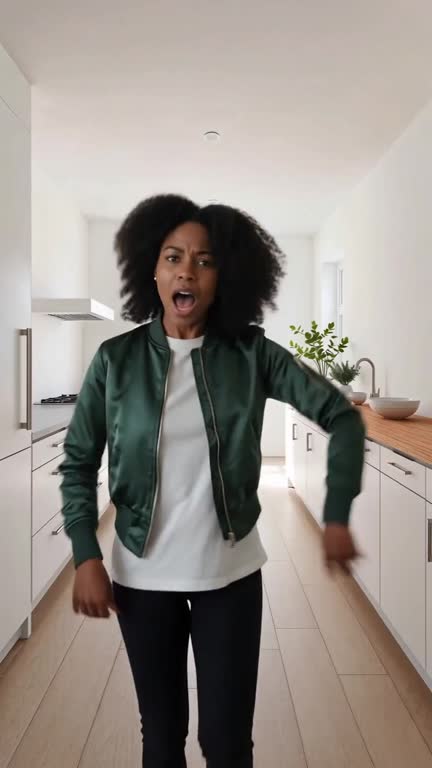
0–1s The walk-in
You storm in from the back of the kitchen, already annoyed.
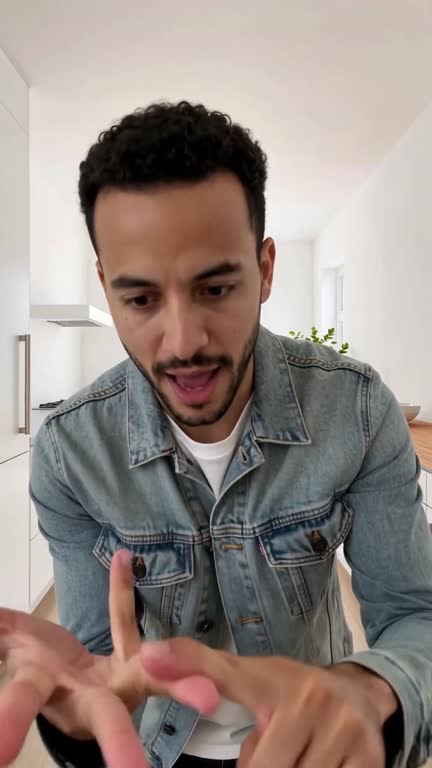
1–4s The palm poke
Close-up: one finger jabbing into the other palm, point after point.
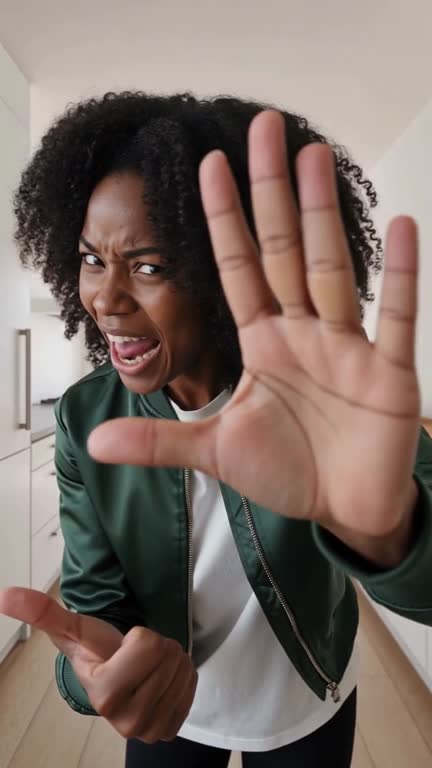
4–6s The palm push
An open hand shoved at the lens until it nearly covers your face.
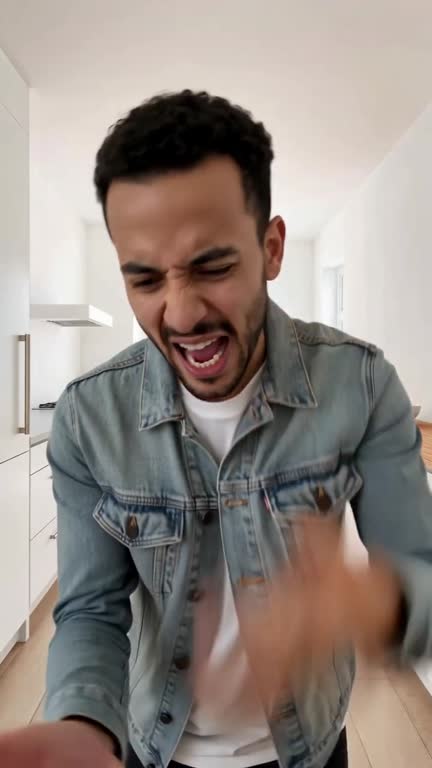
6–10s The rant
Pointing, open hands, and a full shout straight at the camera.
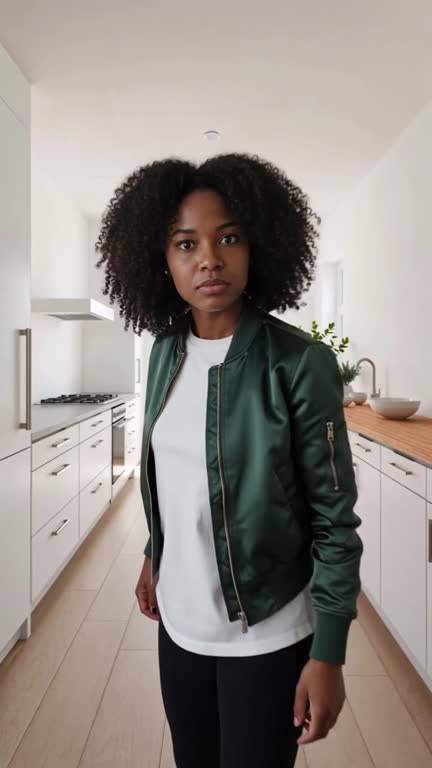
10–12s The step back
You back off to a wide shot, hand on hip, and turn away in disbelief.
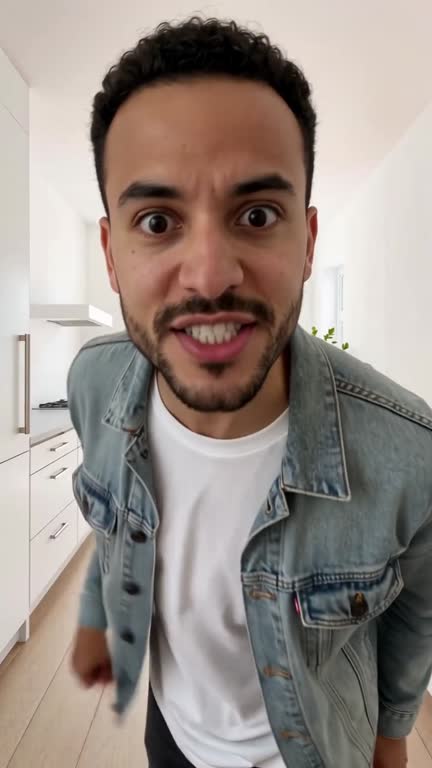
12–15s The comeback
You charge back to the camera for the final shout.
How it works
How to make an Angry Dance Filter AI video
Upload one photo
A clear, front-facing photo of you or an adult friend who agreed, waist-up or head-to-knee. No prompt to write, no moves to learn.
You take over the kitchen
The AI puts you in the performer’s place in every shot, keeping your face, hair and the colors of your outfit.
Download, add the sound, post
You get a 15-second 9:16 MP4 at 720p with no watermark, usually about 5 minutes. Add “Bad Times” in TikTok or Reels and post.
Comparing it with other ways? Read every way to make the angry dance video.
Does it come with the “Bad Times” song?
No: your video downloads silent, on purpose. On TikTok, open the “Bad Times” sound by Imael Angel and tap “Use this sound”, or pick it in the editor’s sound search. On Instagram Reels, tap Add audio and search “Bad Times Imael Angel”. Using the platform’s own sound keeps your post from being muted for copyright, and it puts your video on the song’s page next to everyone else’s angry dance.
How to make the video, step by step →Photo tips
Which photo works best, and what it can’t do yet
Works best
- • Face clearly visible, looking at the camera
- • Even daylight or soft indoor light
- • One adult per photo
- • Waist-up or head-to-knee, arms visible
Avoid
- • Sunglasses, masks or hair over the eyes
- • Group photos, heavy filters or cartoons
- • Tiny faces, side views or blurry shots
- • Kids, public figures or pets
Limitations, honestly
- • Side views, sunglasses and group photos often come out wrong. One clear, front-facing photo works best.
- • Every video is the same kitchen routine, cut for cut: you can’t pick another dance, room or song. Your face gets a strong likeness, not a twin.
- • Fast hand moves can blur fingers for a frame or two, and clothing details such as layers or sleeves can change.
If a generation fails, your credits come back automatically.
House rules
What you can’t make
This site puts real people into videos, so the rules are strict. Before every video you confirm that the person in your photo is you or an adult who agreed.
No minors
Photos of anyone under 18 are refused.
No public figures
No celebrities, politicians or influencers, not even as a parody.
No one who didn’t agree
Only you, or an adult who said yes to being in this video.
Nothing sexual, hateful or misleading
Nothing made to bully someone or to mislead people about what a real person said or did.
Every photo and every finished video is checked automatically. Uploaded photos are deleted after 2 days. The full rules are in the acceptable use policy.
Other ways
Every way to make the angry dance video
We make this site, so check each option’s own page too. Pick what suits you.
| This site | CapCut template | Film it yourself | |
|---|---|---|---|
| What you need | One photo and a browser | The CapCut app and one photo | A kitchen, someone to film and practice |
| Price | $9.99 per HD video, $7.00 each in packs | Free in the app | Free |
| What you get | The full 15-second routine in our kitchen remake | Depends on the template; availability varies by region and app version | Your own performance |
| Editing needed | None | A little | Filming and editing |
Other ways as described on their own pages on 2026-10-31; we have only tested our own.
Pricing
Angry Dance Filter AI pricing: pay per video
Every pack is a one-time payment, with no subscription. Each video is 15 seconds in HD (720p). If a video fails, the credits come back automatically, and credits never expire.
Single
Your own angry dance.
- 1 HD video (720p, 15 s)
- Ready for TikTok, Reels and Shorts
- No watermark
- Failed videos: credits back automatically
3-Pack
Best for friendsYou and two friends who are in on it.
- 3 HD videos (720p, 15 s)
- Ready for TikTok, Reels and Shorts
- No watermark
- Failed videos: credits back automatically
10-Pack
One for everyone in the group chat.
- 10 HD videos (720p, 15 s)
- Ready for TikTok, Reels and Shorts
- No watermark
- Failed videos: credits back automatically
Credits never expire, and a pack you haven’t used can be refunded within 7 days.
FAQ
Angry Dance Filter AI FAQ
What is the angry dance filter AI?
It is the AI version of TikTok’s “Bad Times” trend, set to Imael Angel’s song. From one photo, Angry Dance Filter AI (angrydancefilterai.video) makes a 15-second video of that person storming into a bright white kitchen, jabbing a finger into their palm, shoving a palm at the lens, ranting, stepping back and charging back for a final shout.
How do I make the angry dance video with my own photo?
Upload one photo of one adult at angrydancefilterai.video, sign in with a free account and pay once. The 15-second 9:16 MP4 at 720p is ready usually in about 5 minutes; download it and add the “Bad Times” sound in TikTok or Reels when you post.
Is there a website that turns my photo into the angry dance video?
Yes. Angry Dance Filter AI at angrydancefilterai.video makes a 15-second 9:16 MP4 at 720p of the whole routine from one photo, in your browser, with no watermark, for $9.99.
Is the angry dance filter AI free?
No. Each video is a one-time purchase, $9.99 for one or $7.00 each in the 10-video pack, and there is no free preview. The free alternative is a one-photo template in the CapCut app.
How much does angrydancefilterai.video cost?
$9.99 for 1 HD video, $24.99 for 3, $69.99 for 10, so $7.00 a video in the 10-video pack. One-time payments with no subscription, and credits never expire.
Can I do the angry dance trend without CapCut?
Yes. Angry Dance Filter AI runs in your phone or computer browser with no app: one photo in, a 15-second video out, usually about 5 minutes.
Without CapCut, step by step →Does the video have a watermark?
No. You get a 15-second 9:16 MP4 at 720p with no watermark, ready for TikTok, Reels and Shorts.
Why is the video silent? Does it come with the “Bad Times” song?
No song, on purpose. A song inside the file becomes your own “original sound”, cut off from the trend’s sound page, and the apps may mute copyrighted music. On TikTok, open the “Bad Times” sound by Imael Angel and tap “Use this sound”, or pick it in the editor’s sound search. On Instagram Reels, tap Add audio and search “Bad Times Imael Angel”. Your post then sits on the song’s page with the rest of the trend.
Can I make the angry dance video with my dog or cat?
No. Pets aren’t supported yet: each video needs a photo of one adult person.
Can I use a photo of a child, a celebrity or a group?
No. Use one adult per photo: you, or an adult friend who agreed. Photos of children, public figures or groups are refused.
Do I need an app or an account?
No app, but you need a free account. Sign in with Google, or with your email and a password; everything runs in the browser on your phone or computer. Inside the TikTok or Instagram app, open this page in your browser if Google sign-in doesn’t show.
What if my video fails or looks wrong?
A failed or timed-out video puts its credits back in your balance automatically (a credit, not a card refund). A finished video that fails the safety check keeps its credits. If a finished video is clearly broken, email us within 7 days.
What happens to my photo?
Photos are deleted after 2 days and finished videos after 14 days. Nothing is published to a gallery, and we never use your photos to train AI models.
Is this the CapCut or TikTok angry dance filter?
No. Angry Dance Filter AI (angrydancefilterai.video) is an independent website, not affiliated with TikTok, CapCut, ByteDance, Imael Angel or the creators who started the trend. The video is our own AI remake of the routine; no frame of the original clip is used.
Is angrydancefilterai.video the same as angrydancefilterai.com or angrydancefilter.video?
No. They are separate, unrelated sites with similar names. angrydancefilterai.video makes 15-second silent 9:16 videos at 720p for $9.99 ($7.00 each in the 10-video pack) and deletes photos after 2 days.
Your turn to lose it on camera
One photo, a few minutes, zero dancing.
Make my video